"The best way to learn infrastructure is to own every layer of it."
Why Self-Host a Blog?
Most blogs run on managed platforms. WordPress, Ghost, Medium. Simple, reliable, managed. You write, they handle everything else.
But I wanted to understand production Kubernetes at a level you don't get from tutorials or managed services. Theory is useful. Breaking things at 2am and fixing them is educational.
So I built a blog platform on a mini PC running K3s. Self-hosted. Self-managed. Every layer from the bootloader to the ingress controller under my control. I learn by breaking things, fixing state drift, debugging OOM kills, and tuning resource limits.
This is the full technical breakdown of running a production K3s blog on a homelab cluster.
The Stack
Hardware: Compact mini PC with integrated GPU, 64GB RAM. Single-node K3s cluster. Lives under my desk. Draws about 35W idle, 65W under load. Efficient enough to run 24/7 without breaking the bank.
Software: K3s Kubernetes, FluxCD for GitOps, Bun.js for the blog application, PostgreSQL for data, Prometheus + Grafana + Loki for observability, Cloudflare for DNS and edge caching.
Everything is declarative. Git is the source of truth. Changes get committed, FluxCD reconciles, pods update. No manual kubectl apply. No SSH sessions to fix state drift. Just git commits and automatic sync.
Architecture Overview
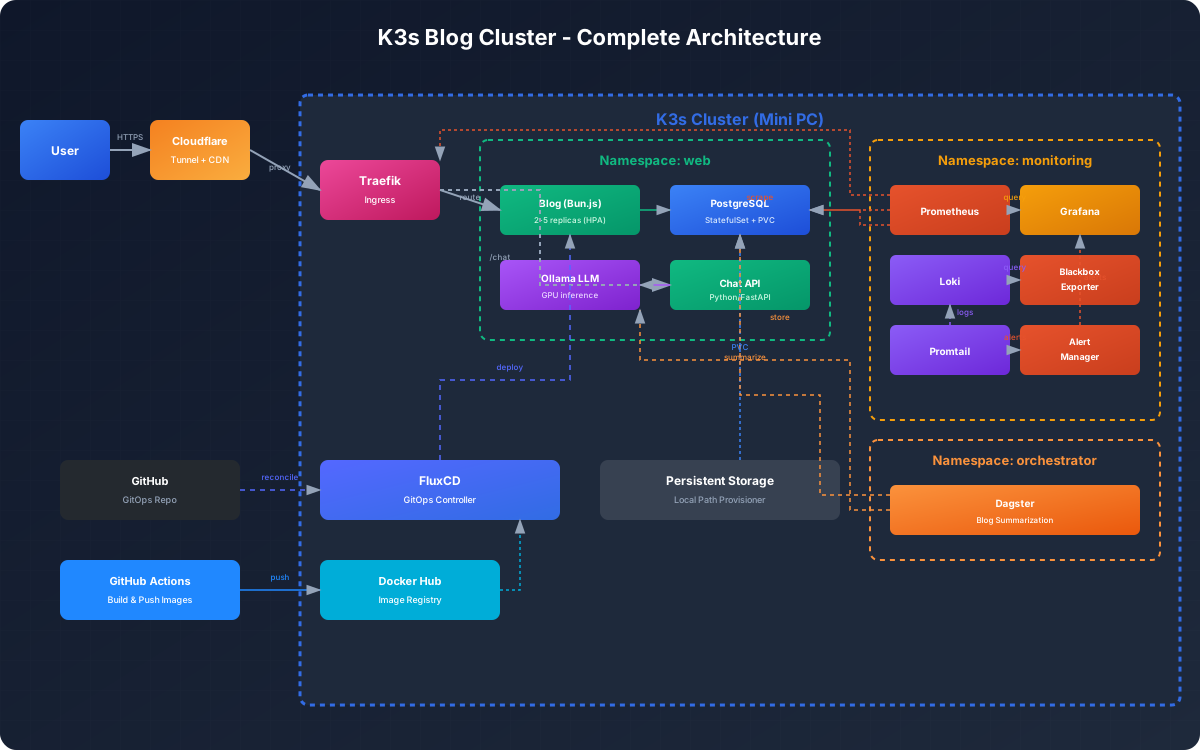
The cluster runs multiple namespaces. web for user-facing services (the blog, chat application, portfolio backend). monitoring for observability. orchestrator for Dagster jobs. flux-system for GitOps.
Each namespace is isolated. Resource quotas prevent runaway processes. Network policies restrict cross-namespace communication to what's explicitly needed.
Complete Architecture
The Blog Application
Bun.js serves the blog. Server-side rendering for each request. Reads markdown files from the content directory, parses frontmatter, renders HTML with syntax highlighting. Fast. Simple. No client-side JavaScript hydration needed.
PostgreSQL stores metadata. Blog posts, tags, view counts, comment metadata. The app reads markdown from disk but queries Postgres for indexes, relationships, and aggregations.
Deployment runs 2 replicas behind a load balancer. HPA (Horizontal Pod Autoscaler) scales from 2 to 5 pods based on CPU utilization. Rarely hits 3. Traffic is modest.
apiVersion: apps/v1
kind: Deployment
metadata:
  name: blog
  namespace: web
spec:
  replicas: 2
  template:
    spec:
      containers:
      - name: blog
        image: sudhan03/blog:latest
        resources:
          requests:
            cpu: "100m"
            memory: "128Mi"
          limits:
            cpu: "500m"
            memory: "512Mi"
FluxCD watches the container registry. When CI pushes a new image, FluxCD detects the tag change and updates the deployment. Rollout happens automatically. Old pods terminate gracefully after new ones pass health checks.
GitOps with FluxCD
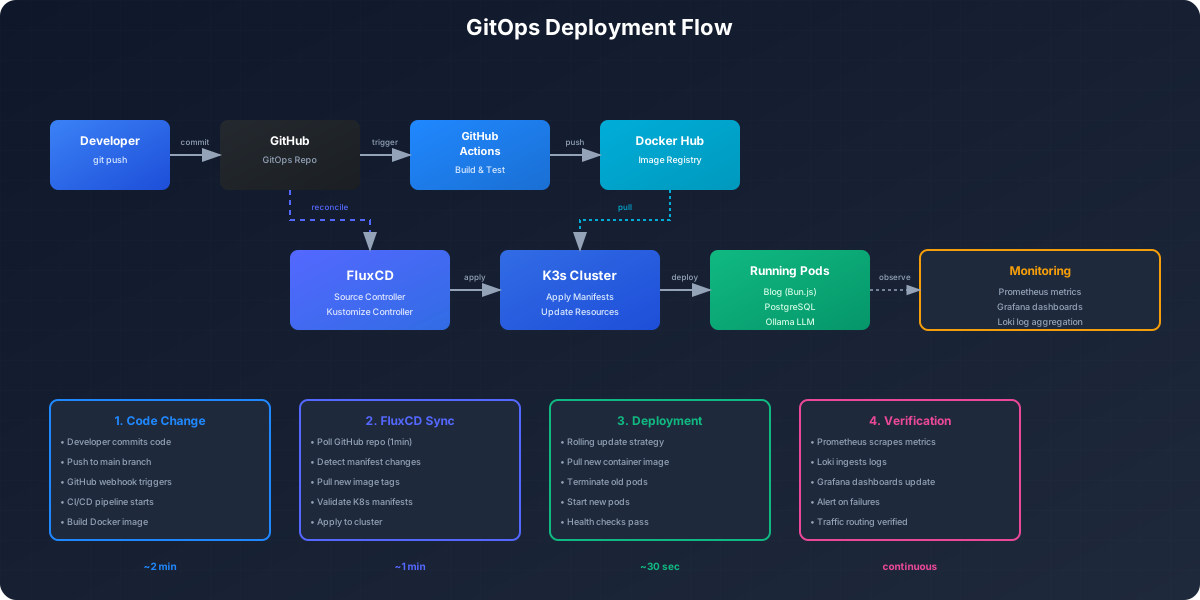
Every Kubernetes manifest lives in a Git repository. Deployments, services, ingresses, secrets (encrypted), config maps. FluxCD runs in the cluster, polls the repo every minute, applies changes.
The workflow:
- Edit YAML locally
- Commit and push to main
- FluxCD detects the change
- Applies the diff to the cluster
- Pods restart with new config
No manual kubectl apply. No imperative changes. If the cluster state drifts from Git, FluxCD corrects it. Disaster recovery is cloning the repo and pointing FluxCD at it.
GitOps Flow
Data Layer
PostgreSQL runs as a StatefulSet with a persistent volume. 50GB SSD-backed storage. Single replica. Not highly available, but the failure domain is acceptable. This is a blog, not a payment system.
Database schema supports both content management and user engagement:
poststable for blog metadatatagstable for categoriescommentstable with client tracking for identity persistencepage_views,events,user_sessionsfor in-house analyticsnewsletter_subscribersfor email collectioncomment_summariesfor AI-generated comment insights
Automated backups run daily via a CronJob. Dumps to a local PVC, then rsyncs to an offsite location. Retention is 30 days local, 90 days offsite.
-- Core tables
CREATE TABLE posts (
  id TEXT PRIMARY KEY,
  title TEXT NOT NULL,
  slug TEXT UNIQUE NOT NULL,
  content TEXT,
  excerpt TEXT,
  created_at TIMESTAMP DEFAULT NOW(),
  status TEXT DEFAULT 'draft'
);

CREATE TABLE tags (
  name TEXT PRIMARY KEY,
  count INTEGER DEFAULT 0
);

CREATE TABLE post_tags (
  post_id TEXT REFERENCES posts(id),
  tag_name TEXT REFERENCES tags(name),
  PRIMARY KEY (post_id, tag_name)
);

-- Comments with client tracking for name persistence
CREATE TABLE comments (
  id BIGSERIAL PRIMARY KEY,
  post_id VARCHAR(50) NOT NULL,
  display_name TEXT NOT NULL,
  content TEXT NOT NULL,
  client_id UUID,  -- Anonymous ID for cross-post identity
  status comment_status NOT NULL DEFAULT 'approved',
  created_at TIMESTAMP WITH TIME ZONE NOT NULL DEFAULT NOW()
);

CREATE INDEX idx_comments_client_id ON comments(client_id);
Connection pooling via PgBouncer keeps connections manageable. Blog pods hit PgBouncer, which maintains a pool to Postgres. Efficient, stable, no connection churn.
Monitoring Stack
Observability is critical when you're the only ops person. I need to know when things break before users do.
Prometheus scrapes metrics from every pod. CPU, memory, request rates, error rates, custom business metrics. 15-day retention. Queries are fast. Dashboards are instant.
Grafana visualizes everything. Kubernetes cluster metrics, application performance, database queries, ingress traffic. Custom dashboards for blog-specific KPIs: posts published, page views, comment rates.
Loki aggregates logs. Every pod streams logs to Loki via Promtail. Queryable, indexed, correlated with traces. Errors surface immediately. Debugging is grep on steroids.
Blackbox Exporter monitors external endpoints. Hits the blog URL every 30 seconds, records latency and uptime. Alerts fire if the site is down for more than 2 minutes.
Monitoring Architecture
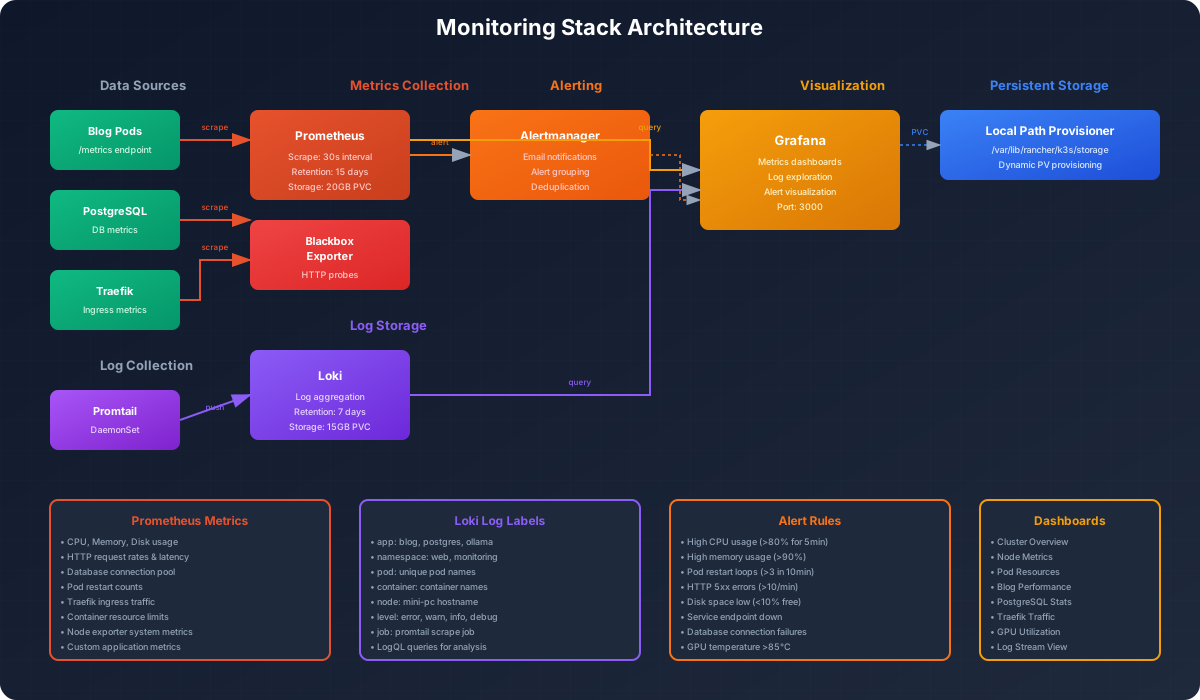
Alerts go to Gotify (self-hosted notification server). Critical alerts hit my phone. Warning alerts batch to hourly summaries. I don't wake up for minor issues, but I know when the cluster is truly broken.
In-House Analytics
The blog tracks user behavior with a custom analytics system. No Google Analytics API calls. No third-party trackers. Everything stored in PostgreSQL.
GDPR-Compliant Consent: Cookie consent banner appears on first visit. Analytics only initialize after explicit acceptance. Users can decline, and the site works perfectly without tracking.
Tracked Events:
- Page views (URL, title, referrer, timestamp)
- Link clicks (destination, link text)
- Scroll depth (25%, 50%, 75%, 100%)
- Time on page (measured on page exit)
Anonymous Identity: Each visitor gets a random UUID stored in localStorage. Sessions are tracked with session IDs in sessionStorage. No IP addresses logged. No personal data collected.
// Telemetry batching for efficiency
trackEvent(name, data) {
  this.events.push({ name, timestamp: new Date().toISOString(), data });
  if (this.events.length >= 5) this.flush();
}

// Reliable delivery on page unload
window.addEventListener('beforeunload', () => {
  navigator.sendBeacon('/api/telemetry', JSON.stringify(data));
});
The system batches events to reduce database writes. Events are flushed every 5 events or on page unload via sendBeacon for reliability.
Analytics Schema:
user_sessions: Anonymous user tracking across visitspage_views: Every page load with referrer contextevents: Custom events (clicks, scrolls, form submissions)
Query performance is excellent. Indexed by session_id and timestamp. Retention is indefinite (disk is cheap). No sampling, no data loss.
Ingress and Networking
Traefik is the ingress controller. Routes HTTP traffic based on Host headers. blog.sudharsana.dev → blog service. grafana.sudharsana.dev → Grafana. api.sudharsana.dev → backend API.
TLS termination happens at Traefik via cert-manager. Let's Encrypt certificates, automated renewal. HTTPS everywhere. Redirect loops and certificate errors taught me more about TLS than any book.
Cloudflare sits in front as a CDN and DDoS shield. DNS points to Cloudflare. Cloudflare proxies to my home IP via a Cloudflare Tunnel. No port forwarding. No exposed home IP. Secure, simple, free.
Traffic flow:
- User hits
blog.sudharsana.dev - Cloudflare DNS resolves
- Request proxied through Cloudflare Tunnel
- Traefik receives, terminates TLS
- Routes to blog service
- Load balancer picks a pod
- Bun.js renders HTML
- Response flows back
Latency is surprisingly low. 50-100ms for domestic requests. Cloudflare edge caching helps. Most assets are cached. HTML is not. SEO and freshness matter more than speed for static content.
Resource Management
Single-node clusters are resource-constrained. 64GB RAM sounds like a lot until you run Prometheus, Grafana, Loki, PostgreSQL, multiple app pods, and background jobs.
Resource requests and limits on every container prevent one service from starving others. Blog pods request 100m CPU and 128Mi memory. Under load, they can burst to 500m CPU and 512Mi memory.
Prometheus gets more resources. 1GB memory, 500m CPU. It stores 15 days of high-cardinality metrics. Grafana gets 512Mi memory for dashboards and query processing.
The Ollama LLM pod is the resource hog. 48Gi memory limit for the integrated GPU (which uses shared system RAM). The GPU requires specific environment variables and /dev/kfd device access for ROCm support. One wrong setting and it segfaults.
HPA prevents runaway scaling. Blog scales 2-5 pods. API scales 1-3 pods. I've hit the limits during traffic spikes (Reddit posts, Hacker News mentions). The cluster survived, but CPU throttling was visible.
AI-Powered Features
The blog leverages local LLM inference for several user-facing features. No API costs, no rate limits, complete privacy.
AI-Generated Display Names
When users first visit the blog, they're assigned a creative AI-generated username like "Aethyr-Wanderer-42857", "Nyx-Seeker-91024", or "Vahana-Drifter-38420". Unlike simple random selection from word lists, the LLM truly invents mythologically-inspired usernames.
Creative Process:
- Mythological Invention: The AI draws from global mythologies (Greek, Norse, Hindu, Egyptian, Mesopotamian) to invent new myth-sounding words rather than recycling famous god names
- Internal Novelty Checks: The model internally evaluates whether generated names feel unique and evocative before outputting
- Fallback Lists: Only if invention fails, the system uses curated rare word combinations (avoiding overused internet clichés)
- High Temperature: Uses temperature 0.95 for maximum creativity and diversity
This approach truly leverages AI's generative capabilities—producing names like "Khepri-Echo" or "Zephyros-Flame" that wouldn't emerge from simple randomization. The system:
- Calls Ollama (gemma3:12b) with a 2-second timeout
- Generates mythologically-creative Word-Word-5DigitNumber format
- Falls back to cryptographically random generation if AI is unavailable
- Stores the name in browser localStorage for persistence
Identity Persistence: Users can set custom names, and the system updates ALL their previous comments across all posts in the database. The client_id column tracks anonymous identity, enabling cross-post name consistency without user accounts. Display names are enforced unique—preventing impersonation across different anonymous users.
// Name generation with hybrid AI + fallback
const name = await fetch('/api/generate-name', {
  signal: AbortSignal.timeout(2000)
});
// AI invents mythological names with internal novelty checks
// Falls back to: Rare word combinations + crypto.getRandomValues()
Comment Moderation
Every comment passes through AI moderation before approval. Ollama analyzes content for harmful, offensive, or spam content with temperature 0.1 for consistent judgments.
Moderation is asynchronous and non-blocking. Comments appear immediately, but flagged content gets auto-rejected in the background. False positives are rare due to the lenient prompt design.
// Async moderation (doesn't block user response)
moderateComment(content, authorName).then(result => {
  if (result.isHarmful) {
    db.query('UPDATE comments SET status = $1 WHERE id = $2',
      ['rejected', commentId]);
  }
});
Comment Summarization
Long comment threads get AI-generated summaries. Ollama condenses multiple comments into 2-3 sentence insights displayed above the comment form. Summaries update via Dagster background jobs when comment count thresholds are reached.
Users see "What readers are saying" boxes with synthesized takeaways, saving time on long discussions.
Ollama LLM Integration
All AI features run through a single Ollama deployment on the cluster's integrated GPU. Blog pods call Ollama over HTTP (ollama-service.web:11434). The Ollama pod runs the ROCm variant with proper GPU device access.
This setup is hybrid cloud-homelab. Firebase portfolio functions call my K3s cluster for LLM inference. No OpenAI API costs. Just electricity.
Getting ROCm working on an integrated GPU was non-trivial. The GPU architecture required specific environment variable overrides to bridge compatibility gaps. Without correct configuration, containers exit with segfaults.
env:
- name: HSA_OVERRIDE_GFX_VERSION
  value: "11.0.0"  # Architecture compatibility bridge
Deployment Strategy
Rolling updates are the default. FluxCD updates the deployment, Kubernetes creates new pods, waits for readiness, then terminates old pods. Zero downtime in theory. Occasional connection blips in practice.
Readiness probes prevent premature traffic routing. The blog exposes /health that returns 200 when the app is ready. Kubernetes waits for 3 consecutive successes before adding the pod to the load balancer.
readinessProbe:
  httpGet:
    path: /health
    port: 3000
  initialDelaySeconds: 5
  periodSeconds: 10
Rollbacks are manual but fast. FluxCD can pin to a previous Git commit, reapply manifests, and restore the old state. Alternatively, kubectl rollout undo works for quick reverts.
Persistent Storage
Local path provisioner handles persistent volumes. Data lives on the mini PC's SSD. Not replicated. Not distributed. Just local storage with automatic directory management.
PostgreSQL mounts a 50GB volume. Grafana dashboards mount 10GB. Loki logs mount 20GB. Ollama models mount 30GB. Total ~110GB used of 1TB available.
Backups mitigate the single point of failure. Daily database dumps. Weekly full cluster state exports. Offsite copies via rsync. Recovery time objective is under 1 hour with the backup scripts.
Security Model
Network Policies: Restrict pod-to-pod communication. Blog pods can talk to Postgres. Monitoring pods can scrape metrics. Everything else is denied by default.
Secrets Management: Kubernetes Secrets (base64-encoded, not great). Exploring External Secrets Operator to pull from a proper vault. For now, Git-tracked secrets are encrypted with SOPS (encrypted YAML, safe to commit).
Image Scanning: Trivy scans container images in CI. Critical vulnerabilities block deployment. High-severity issues get flagged for review.
Updates: Dependabot keeps dependencies current. K3s upgrades happen quarterly after testing in a VM. Unattended upgrades for the underlying Ubuntu system.
Things That Broke
Kubernetes doesn't care about your confidence. It breaks in ways you don't expect.
Pod evictions: Memory limits were too low. Pods got OOMKilled under load. Increased limits and added swap as a buffer. Now stable.
GPU state corruption: AMD GPU MES errors required full system reboots. Can't recover from kernel GPU state without restarting. Rare, but painful.
FluxCD drift: A manual kubectl apply once caused FluxCD to reconcile incorrectly. Lesson: never bypass GitOps. Fixing the drift took an hour of diff comparison.
Certificate renewal failures: Let's Encrypt rate limits hit when I churned through domains testing. Waited a week, fixed configs, automated properly.
Ingress routing conflicts: Two services with overlapping path prefixes caused 404s. Fixed with explicit ordering and better path matching.
None of these were exotic. They were normal operations gone wrong. That's the lesson. Systems break predictably when you violate their assumptions.
What This Taught Me
Kubernetes is not magic. It's state reconciliation with better tooling. The learning curve is steep, but the primitives make sense once you stop fighting them.
Observability is non-negotiable. Logs, metrics, traces. You need all three. When the blog is slow, I check Grafana. When errors spike, I query Loki. When deployments fail, I check FluxCD logs. No observability, no operations.
GitOps changes how you think about infrastructure. Instead of "how do I fix this broken pod," I ask "what Git commit caused this state?" The answer is always in the diff.
Single-node clusters are viable. With proper resource limits, monitoring, and backups, a mini PC can run a production blog. Uptime is 99.5%. Good enough for a personal project.
Self-hosting isn't cheaper, but it's more valuable. Electricity, hardware amortization, time investment. Economically, Firebase wins. Educationally, self-hosting wins. I know this stack deeply because I built it, broke it, and fixed it.
Performance Metrics
Uptime: 99.5% over the last 6 months. Downtime was planned upgrades and one power outage.
Response time: P50 is 80ms. P95 is 110ms. P99 is 120ms. Static assets are faster due to Cloudflare caching.
Resource utilization: Average CPU 2%. Average memory 10GB of 64GB (16%). Disk I/O is negligible except during backups.
Cost: $5/month in electricity. $500 hardware amortized over 5 years = $8.33/month. Total: ~$13/month for a full homelab.
What's Next
The platform is stable. No major architectural changes planned. Possible enhancements:
- Multi-node cluster with a second mini PC for high availability
- External Secrets Operator for better secrets management
- Service mesh (Linkerd) for advanced traffic management and mTLS
- Automated DR testing to validate backup/restore procedures
But honestly? The system works. It's fast, reliable, observable, and maintainable. Sometimes the best infrastructure decision is to stop iterating and focus on content instead.
Cluster Infrastructure: GitHub Repo
Blog: blog.sudharsana.dev

Comments (0)