"Cost optimization isn't about being cheap. It's about being smart with resources."
Learning cloud architecture is as much about economics as it is about engineering. My portfolio website started simple—HTML, CSS, JavaScript. But when it came time to deploy, I made the classic beginner mistake: over-engineering the infrastructure for what was basically a static site.
The $20/Month Static Website Problem
I set up a Google Cloud Storage bucket for the static files and put a Cloud Load Balancer in front of it for HTTPS. Custom domain through Cloudflare DNS. Felt pretty professional.
Then the bill came. $18 a month for the load balancer alone. Another $0.50 for storage, $1 for data transfer. Total: ~$21.50/month. For a static site getting maybe 100 visitors a month.
97% of my cost was the load balancer doing almost nothing.
Finding Firebase
After a few months of those bills, I started looking for alternatives. What I needed was simple: serve static content globally, handle HTTPS automatically, cost close to zero for low traffic, and scale if needed.
Firebase Hosting checked all those boxes.
Complete Architecture
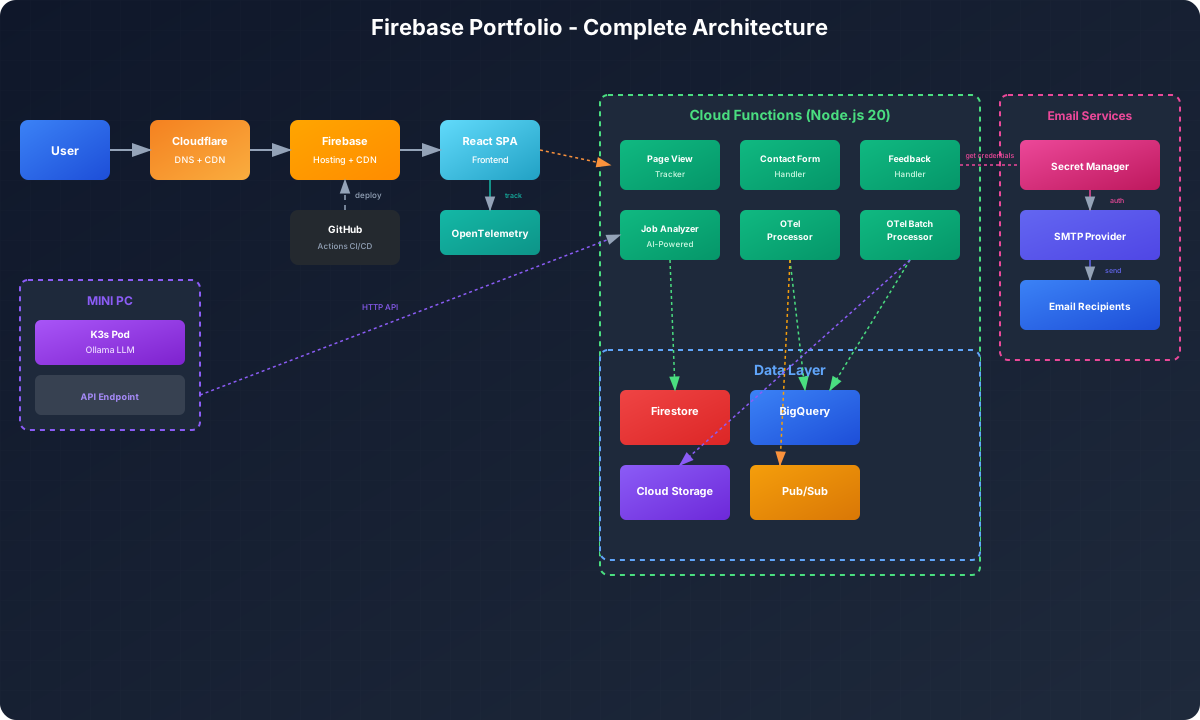
The architecture evolved beyond just static hosting. Here's what the complete system looks like now:
The Serverless Stack
Frontend Layer
The React SPA sits at the heart of the application. Single-page architecture with client-side routing. Components for About, Experience, Skills, Contact, and an AI-powered job fit analyzer. Firebase Hosting delivers it globally through their CDN.
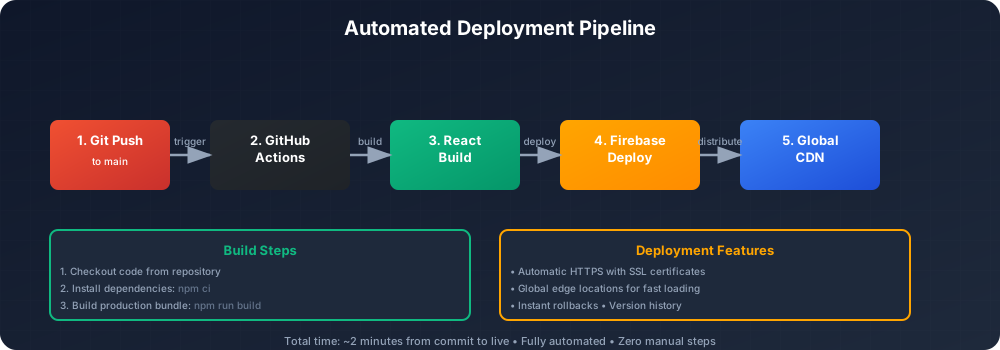
Deployments are automated through GitHub Actions. Push to main, and the site rebuilds and deploys automatically. Takes about 2 minutes from commit to live.
Backend Layer - Cloud Functions
The portfolio runs six Cloud Functions, each handling specific tasks:
1. Page View Tracker
Tracks website visits and celebrates mathematical milestones. When someone visits, it increments a Firestore counter and checks if the number is special (prime, perfect, or Fibonacci). Hit visit 1,597? You get a Fibonacci celebration. Visit 28? That's a perfect number.
Rate limited to 20 requests per minute to prevent abuse.
2. Contact Form Handler
Processes contact form submissions with full email integration. Validates inputs, stores submissions in Firestore, and sends formatted HTML emails to multiple recipients via SMTP.
Email credentials stored securely in Google Secret Manager. No secrets in code. The function pulls SMTP credentials at runtime, composes a professional HTML email, and delivers it through Nodemailer.
Rate limited to 3 submissions per minute per IP.
3. Feedback Handler
Processes user feedback with star ratings. Accepts 1-5 star ratings with optional comments. Stores feedback in Firestore and sends rich HTML email notifications with star visualizations.
Anonymous feedback supported. You can leave feedback without providing an email address.
Rate limited to 5 requests per hour per IP.
4. Job Description Analyzer
AI-powered job fit analysis. Paste a job description, and it analyzes the role against my resume data. Calculates match percentage, identifies relevant qualifications, and explains areas of interest or misalignment.
This function integrates resume data stored as structured JSON and connects to an Ollama LLM running on my self-hosted K3s cluster (the same mini PC that hosts this blog). The Cloud Function makes an API call to the LLM endpoint for intelligent analysis. It's a hybrid architecture: serverless frontend with self-hosted AI inference.
Rate limited to 10 requests per hour per IP.
5. OpenTelemetry Data Processor
Real-time processing of observability data. The frontend instruments user interactions using OpenTelemetry SDK (traces, metrics, and logs). This function receives that data via HTTP POST, validates it, and routes it to BigQuery for analytics and Pub/Sub for batch processing.
Handles traces (user journey tracking), metrics (Core Web Vitals, performance data), and logs (errors, debug info). It's CCPA-compliant with explicit user consent.
Rate limited to 200 requests per minute.
6. OpenTelemetry Batch Processor
Triggered by Pub/Sub messages from the real-time processor. Handles batched observability data, compresses it, archives it to Cloud Storage for long-term retention, and performs final BigQuery storage for analysis.
This separation allows for efficient processing without blocking the frontend. Real-time data goes to BigQuery immediately for dashboards. Batch processing handles archival and cleanup asynchronously.
Data Layer
Firestore stores operational data. Collections for page views, contact submissions, feedback entries, job analyses, and telemetry sessions. Document-based NoSQL with real-time sync capabilities.
BigQuery handles analytics. Separate tables for traces, metrics, and logs. The OpenTelemetry pipeline feeds all observability data here. SQL queries provide insights like most visited pages, user engagement patterns, error rates, and performance trends.
Cloud Storage archives historical data. The batch processor stores compressed telemetry data for long-term retention. Cost-effective storage for compliance and historical analysis.
Pub/Sub queues telemetry data between the real-time processor and batch processor. It decouples processing stages and handles traffic spikes gracefully.
Email System Architecture
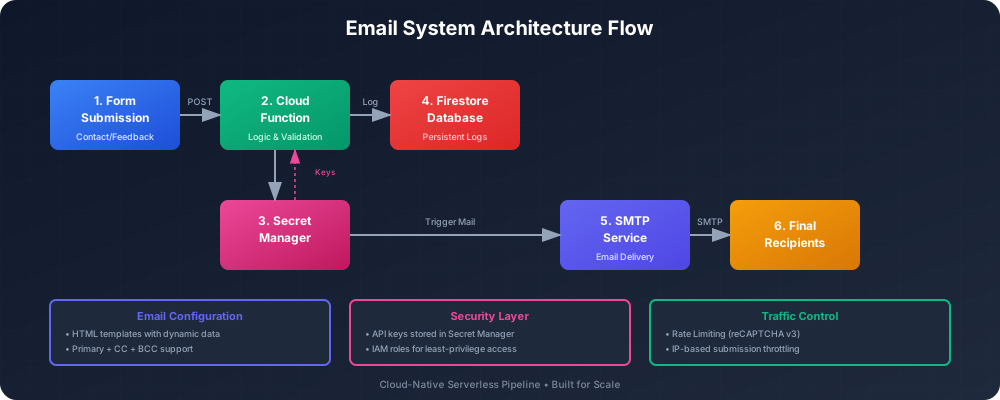
The email system is more sophisticated than it looks. SMTP configuration stored in Google Secret Manager. Primary recipient, optional CC recipients, host, port, SSL settings are all secured.
When a contact form is submitted:
- Cloud Function validates input
- Retrieves SMTP credentials from Secret Manager
- Composes HTML email with professional formatting
- Sends via Nodemailer to configured recipients
- Stores submission in Firestore for record-keeping
Email templates are HTML with inline styles for professional formatting, portfolio branding, and clear message structure. They work across email clients.
Feedback emails include star visualizations: ★★★★★ for 5 stars, ★★★☆☆ for 3 stars, and so on.
Email Flow
Security Architecture
Defense in depth across multiple layers:
Network Security: Cloudflare sits in front for DDoS protection and WAF. HTTPS-only with TLS 1.3. Security headers (CSP, HSTS, X-Frame-Options) on all responses.
Application Security: Every Cloud Function has rate limiting. Per-IP request throttling prevents abuse. Input validation and sanitization on all user inputs. CORS configured to accept requests only from the portfolio domain.
Data Security: Secret Manager encrypts credentials at rest. Cloud Functions access secrets via IAM permissions with no hardcoded credentials. Firestore security rules enforce access control. Database writes only from authenticated Cloud Functions.
Privacy Compliance: CCPA-compliant analytics with user consent. OpenTelemetry only activates if the user opts in. No PII collection, and user IDs are hashed. Data retention policies are configurable, and users can opt out anytime.
Observability
The OpenTelemetry implementation provides comprehensive visibility:
Traces track user journeys through page navigation events, form submissions, button clicks, and API calls. Each trace includes timing data, parent-child relationships, and custom attributes. Distributed tracing shows the full path from frontend interaction to backend processing.
Metrics measure performance including Core Web Vitals (LCP, FID, CLS), custom business metrics (engagement duration, feature usage), error rates, and API latency. Data is aggregated over time for trend analysis.
Logs capture events like JavaScript errors, user actions, debug information, and security events. Structured logging includes severity levels, trace correlation, and resource attributes.
All data flows through the dual-processor pipeline with real-time processing for immediate visibility and batch processing for efficient archival. BigQuery provides a unified analytics platform for SQL queries across all telemetry data.
Cost Reality
The entire stack runs on Firebase's free tier. Zero monthly cost for:
- 10GB static hosting
- 2 million Cloud Function invocations
- 50k Firestore document reads per day
- 360MB/day BigQuery streaming inserts
- 50k Firestore document writes per day
- Cloud Storage (first 5GB free)
Current usage at my traffic levels:
- ~5,000 Cloud Function invocations per month
- ~500MB hosting bandwidth per month
- ~10k Firestore reads per month
- ~50MB BigQuery inserts per month
Well within free tier limits. The trick is understanding the quotas and architecting accordingly. Batching telemetry data reduces writes, sampling traces at 10% keeps BigQuery usage low, and efficient queries minimize Firestore reads.
If traffic grew 10x, I'd still be in the free tier. At 100x traffic, I'd start paying, but that would be a good problem to have.
Deployment Pipeline
GitHub Actions automates everything:
name: Deploy to Firebase
on:
  push:
    branches: [ main ]
jobs:
  deploy:
    runs-on: ubuntu-latest
    steps:
      - uses: actions/checkout@v2
      - name: Build React App
        run: npm ci && npm run build
      - name: Deploy to Firebase Hosting
        uses: FirebaseExtended/action-hosting-deploy@v0
        with:
          repoToken: ${{ secrets.GITHUB_TOKEN }}
          firebaseServiceAccount: ${{ secrets.FIREBASE_SERVICE_ACCOUNT }}
          channelId: live
          projectId: my-project-id
Push to main triggers the build. The React app compiles to static files, and Firebase Hosting deployment pushes to the CDN for global distribution in minutes.
Cloud Functions deploy separately via gcloud functions deploy. Each function can be updated independently with zero downtime deployments.
Deployment Flow
What I Learned
Serverless is not a compromise. For the right workload, it's superior. Zero ops burden, automatic scaling, pay-per-use pricing. My portfolio would cost hundreds per month on traditional infrastructure. On Firebase, it's free.
Free tiers are real infrastructure. Firebase's free tier isn't a trial. It's a production platform for low to moderate traffic. I've run mission-critical workloads on it for years with no artificial limits or sudden cutoffs, just solid infrastructure.
Security is layers, not a single wall. Rate limiting, input validation, secret management, CORS, security headers, and encryption each provide a layer of defense. Compromise one, and the others hold.
Observability isn't optional. You can't fix what you can't see. OpenTelemetry transformed how I understand user behavior. Where do people spend time? What features get used? What causes errors? The data answers questions I didn't know to ask.
Optimize for your constraints. Early on, I optimized for "looking professional" with load balancers, VPCs, and multi-region setups. This cost me $20/month and hours of maintenance. Now I optimize for actual constraints like low cost, minimal ops, and fast iteration. Firebase delivers all three.
AI integration doesn't require commercial APIs. The job description analyzer uses a self-hosted Ollama LLM running on my mini PC. The Cloud Function calls the LLM API endpoint on my local K3s cluster with resume data stored as structured JSON. No OpenAI or commercial API costs, just electricity for the homelab in a hybrid cloud-homelab architecture.
The Hidden Value
Beyond zero costs and zero ops, serverless taught me to think differently about architecture. Instead of "how do I deploy this server," I ask "does this need a server at all?"
Contact form? Cloud Function that fires on demand.
Page views? Increment a Firestore counter.
Analytics? Stream to BigQuery, query when needed.
Email? SMTP via Nodemailer, credentials from Secret Manager.
Every piece does one thing well. No monolithic application servers. No Docker containers to maintain. No kubectl commands to remember. Just functions that execute when called and scale to zero when idle.
That architectural mindset transfers. At work, when I see a new requirement, I first ask if it can be event-driven, stateless, and serverless. Often, it can.
The Tradeoffs
Serverless isn't perfect. Cold starts can add latency (though Firebase handles this well). Debugging is harder—no SSH access, no live logs, just what Cloud Logging captures. Vendor lock-in is real; my portfolio is tightly coupled to Firebase and GCP.
But for a portfolio site? Those tradeoffs are worth it. Cold starts are measured in milliseconds. Debugging happens in Cloud Logging, which has better search than grep. Vendor lock-in matters less when the vendor's free tier covers my needs indefinitely.
The alternatives aren't better. Self-hosting means maintenance burden. Other cloud providers charge more. Hybrid approaches add complexity. Firebase strikes the right balance for this workload.
What's Next
The architecture is stable. No major changes planned. Possible future enhancements:
- A/B testing through Firebase's built-in capabilities
- Real-time features via Firestore listeners
- Progressive Web App conversion with service workers
- Machine learning insights on telemetry data in BigQuery
But honestly? The system works. It's fast, reliable, secure, and free. Sometimes the best architecture decision is to stop architecting and ship features instead.
Architecture Docs: ARCHITECTURE.md
Live Site: www.sudharsana.dev

Comments (0)